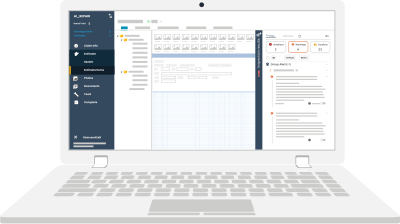
Accurate and compliant estimates are the backbone of a successful business. Actionable Alerts at the instance level offer a sophisticated system designed to ensure estimates meet organizational and industry standards. They serve as a powerful mechanism for maintaining consistency and compliance across all profiles.
This article delves into what instance-level rules are, how they work, and how you can customize them to optimize workflows and ensure accuracy. Furthermore, we will examine how the Actionable Xactimate Profile and the Xact Best Practices Bootcamp help you enhance your understanding of Xactimate and estimating skills.
What Are Instance-Level Alerts?
First, let’s understand what is an instance. It is a virtual network that hosts all your organization's Xactimate IDs and profiles. It is similar to a company account, which users must have to access the projects and profiles associated with it.
As the name implies, instance-level Actionable Alerts are applied at the instance level across all profiles associated with that instance. These rules ensure that any guidelines specific to your organization are also complied with.
This is especially helpful when diverse teams are working on specific kinds of projects but with some constant overarching office guidelines. When rules are applied at the instance level, users across these teams and projects can review and ensure that their estimates comply with these rules.
Key Benefits of Instance-Level Actionable Alerts
Here are some of the benefits of implementing instance-level rules for organizations.
Centralized Estimating Management
By implementing rules at the instance level, organizations can establish a baseline of estimating guidelines that apply across all the profiles and IDs in that instant.
Streamlined Workflows
Teams can focus on creating accurate estimates without worrying about missing critical organization-specific compliance checks.
Improved Consistency
Instance-level rules ensure that all estimates adhere to the same standards. This fosters reliability and trust in the process.
How Do Actionable Alerts Work at an Instance Level?
Instance-level rules fire regardless of the profile selected. When estimators are working in Xactimate, they see the option to review guidance based on the profile selected as well as their instance of Xactimate. They can switch to the "Instance" tab to ensure compliance with broader office guidelines.
Profile-specific rules cater to the individual project’s unique requirements. On the other hand, instance-level rules provide a higher-level compliance check, mostly with organization-specific guidelines. This dual-layer approach ensures that all estimates meet both the specific needs of the project and the overarching standards of the organization.
Customizing Actionable Alerts at an Instance Level
One of the newest and most powerful features of Xactimate’s instance-level rules is the ability to customize them. Actionable can customize instance rules so that they only fire in specific profiles. This level of control is invaluable for organizations operating in diverse environments.
For example:
- If certain instance-level guidance is irrelevant or counterproductive in a specific profile, it can be excluded from firing.
- Rules can also be tailored to align with the unique requirements of specific carriers or project types.
Introducing the Actionable Xactimate Profile
The Actionable Profile is a profile within the Xactimate much like a contractor or a carrier profile, but it leverages XactXpert to provide live estimating guidance. This means that it reviews your estimates and provides feedback in real-time to correct any mistakes and add missing warranted line items. The Actionable Profile ensures your estimates are increasingly accurate and thorough.
How does the live estimating guidance work?
It is easy to understand if you’ve used Grammarly, the popular writing tool. Just like Grammarly, the Actionable Profile reviews your estimate as you’re writing it and provides guidance in the form of alerts in XactXpert.
The Actionable Profile has over 3,500 Actionable Alerts that provide expert and sophisticated guidance. There are two types of estimating guidance in XactXpert:
Overage Alerts
This guidance alerts you if you add too much of something. Another case where this guidance comes into play is when mutually exclusive line items are used together.
Here is an example of Overage Alerts:
If you use drywall and texture line items separately, you’ll receive an alert to remove the texture line item, as drywall already includes it.
Omission Alerts
Omission alerts fire when you forget to include something warranted. Typical scenarios include missing a warranted line item or using lesser than warranted quantities.
Here is an example of Omission Alerts:
If you have used architectural/laminated shingles, you may also want to include a ridge gap.
Actionable Profile and Xact Best Practices Bootcamp
For those looking to master Xactimate and its features, the Xactimate Bootcamp offers an invaluable opportunity to enhance your skills. Whether you’re a beginner or an experienced estimator, this bootcamp provides comprehensive training on Xactimate’s features, including instance-level rules and profile customization, live guidance in XactXpert, and more. Participants gain practical experience through real-world scenarios.
Summary
Instance-level Actionable Alerts provide a powerful framework for maintaining compliance, improving consistency, and optimizing workflows. By understanding how these rules work and leveraging live estimating guidance of the Actionable Profile, estimators can create accurate, thorough estimates, reducing back and forth and friction from the claims process.
About Actionable
We're a 501(c)(6) educational non-profit that builds tools and resources to help the property insurance industry thrive.
For any questions, reach out to us below: